
Making Alarm I/Os Smarter - Part 2
This series of blog posts highlights some of the more advanced features found in the new Optima NEXUS nano and RIO xR3 Remote Terminal Units (RTU).
This second installment provides a look at the alarm threshold handling capabilities common to both models. The article builds upon some of the topics already introduced in PART 1.
Alarm Thresholds
Overview
To offer improved alarm handling flexibility, all RIO xR3 multi-mode hybrid inputs, and all NEXUS nano analog input/discrete contact inputs can be programmed:
- with their own unique sets of alarm thresholds,
- with their own sets of qualification timers,
- with their own sets of extended labels, to make alarms more descriptive.
Most alarm handling devices on the market today only allow for two severity levels per input:
- NORMAL, and
- a user defined ALARM level.
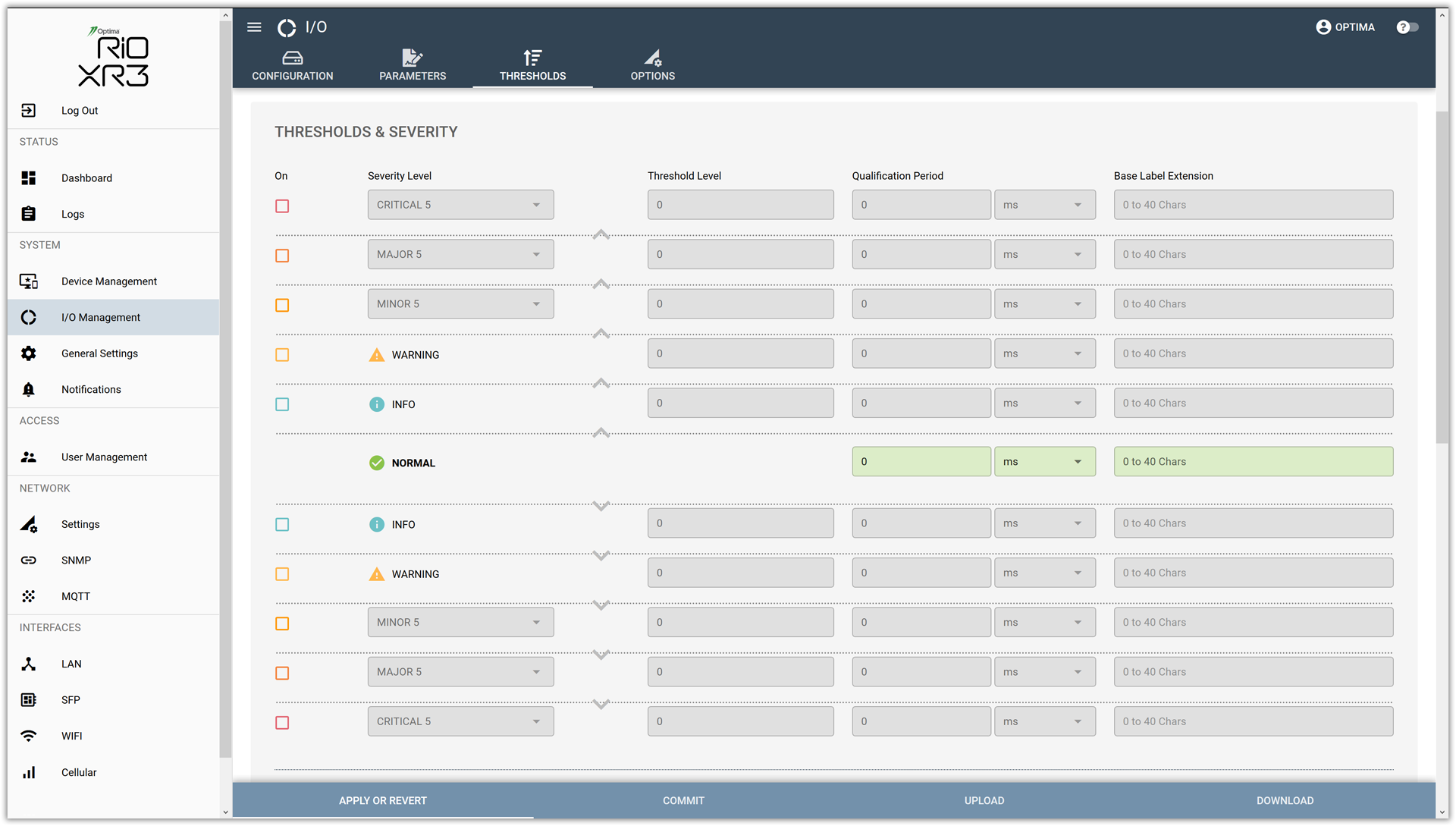
Many times custom coding is required to extend these capabilities. Especially when an application demands more than flipping between these two basic states. In our new RTUs, we now offer an upper and a lower set of thresholds. Each set consists of separate INFO, WARNING, MINOR, MAJOR, and CRITICAL thresholds.
We let the user decide, individually per I/O, which of these thresholds are enabled or disabled. Thereby, the utmost flexibility without the need for custom coding/scripting is achieved. The following section will go through setting up all of the parameters, step-by-step.
Parameters
Use the ON/OFF CHECK-BOXES to enable or disable any of the thresholds.
Select the SEVERITY LEVEL for the currently selected threshold. The following severity levels are available from the drop-down list:
- CRITICAL,
- MAJOR,
- MINOR,
- WARNING, or
- NORMAL.
NOTE: Severity levels are color-coded to make them easier to identify.
Enter the THRESHOLD LEVEL. Once an analog input exceeds (HI-alarm) or dips below (LO-alarm) this level, an alarm notification may be generated.
The QUALIFICATION PERIOD specifies the time an input must remain in the alarm state before the RTU deems the event to be valid.
Select the proper time SCALE for the specified QUALIFICATION PERIOD.
The following time scales are available:
- 0 to 1000 milliseconds (in steps of 5 ms),
- 0 to 240 seconds,
- 0 to 240 minutes, or
- 0 to 240 hours.
Use the BASE LABEL EXTENSION to specify a more descriptive label which will be sent along with every alarm notification once the corresponding alarm threshold has been crossed.
NOTE: The extension label will be added to the base label of the I/O. Maximum length: 40 characters.
Example:
BASE LABEL: Main Site Access Door
BASE LABEL EXTENSION: has been open for more than 5 hours
Result:
The following string will be sent as part of each alarm message caused by crossing the selected threshold:
Main Site Access Door has been open for more than 5 hours
Input Processing
Each input is processed as follows:
- The input signal is conditioned, digitized and cleaned up.
- The obtained value is processed by the analog front end, applying the GAIN, OFFSET, SCALE, BIAS, QUANTIZER settings, as well as the UPPER and LOWER LIMITS.
- The result of the previous stage is then further formatted according to the OUTPUT FORMAT template.
- The UNIT STRING is added.
- Next, the user specified THRESHOLDS are applied.
- Once a threshold has been crossed, the specified QUALIFICATION TIMER or LEVEL TIMER is started.
- Once the TIMER has run out, the signal may be deemed valid.
- The ADAPTIVE ALARM SUPPRESSION (AAS) settings, if enabled, are applied.
- If the event has passed the AAS tests, an alarm event notification will be created and LOGGED.
- Next, logged event notifications must pass the ALARM THROTTLING (if enabled).
- If it passes the ALARM THROTTLING stage, the RTU SENDS out the ALARM to the programmed recipients.
Default Settings
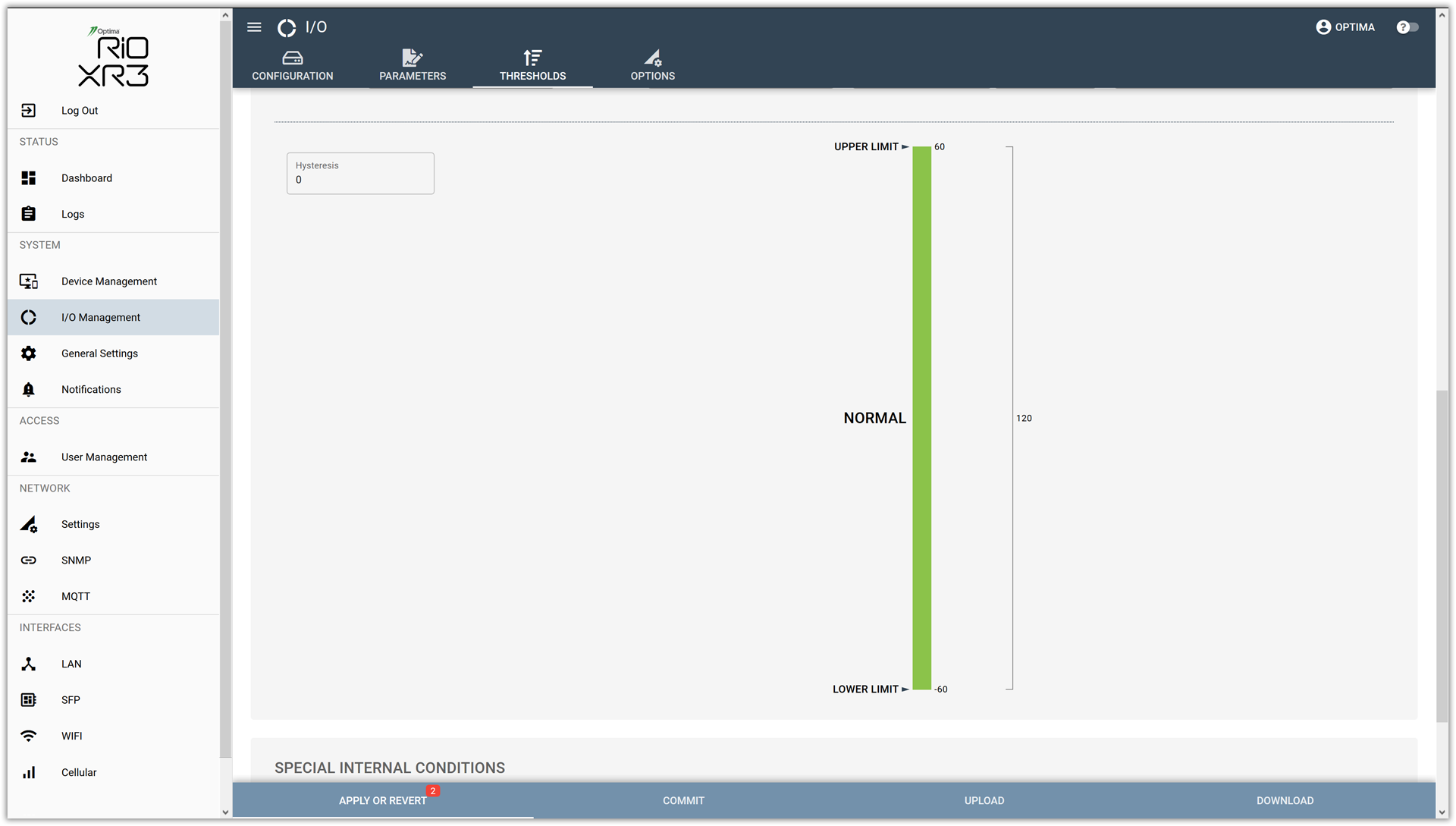
By default, none of the thresholds are enabled (see screen-shot above). Consequently, the entire input range is defined as the **NORMAL range**:
Basic Example
In this basic example, we will only enable one threshold. Here are the basic parameters we have chosen for this example:
INPUT RANGE: 0 Vdc to 60 Vdc
MINOR THRESHOLD: @ 40 Vdc
HYSTERESIS: 5 Vdc
QUALIFICATION PERIOD: 50 ms
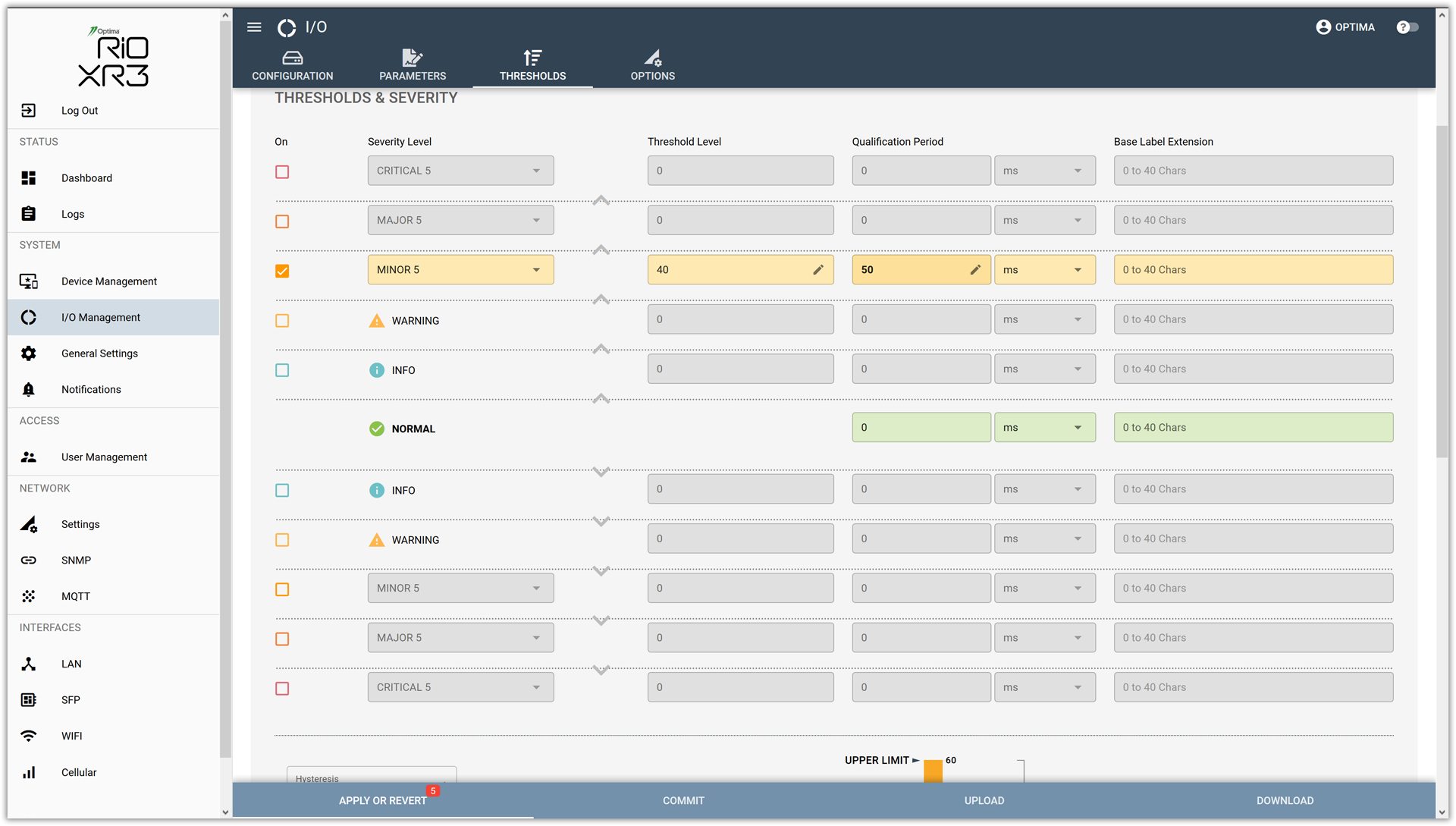
Observe how the corresponding graph changes in real-time:
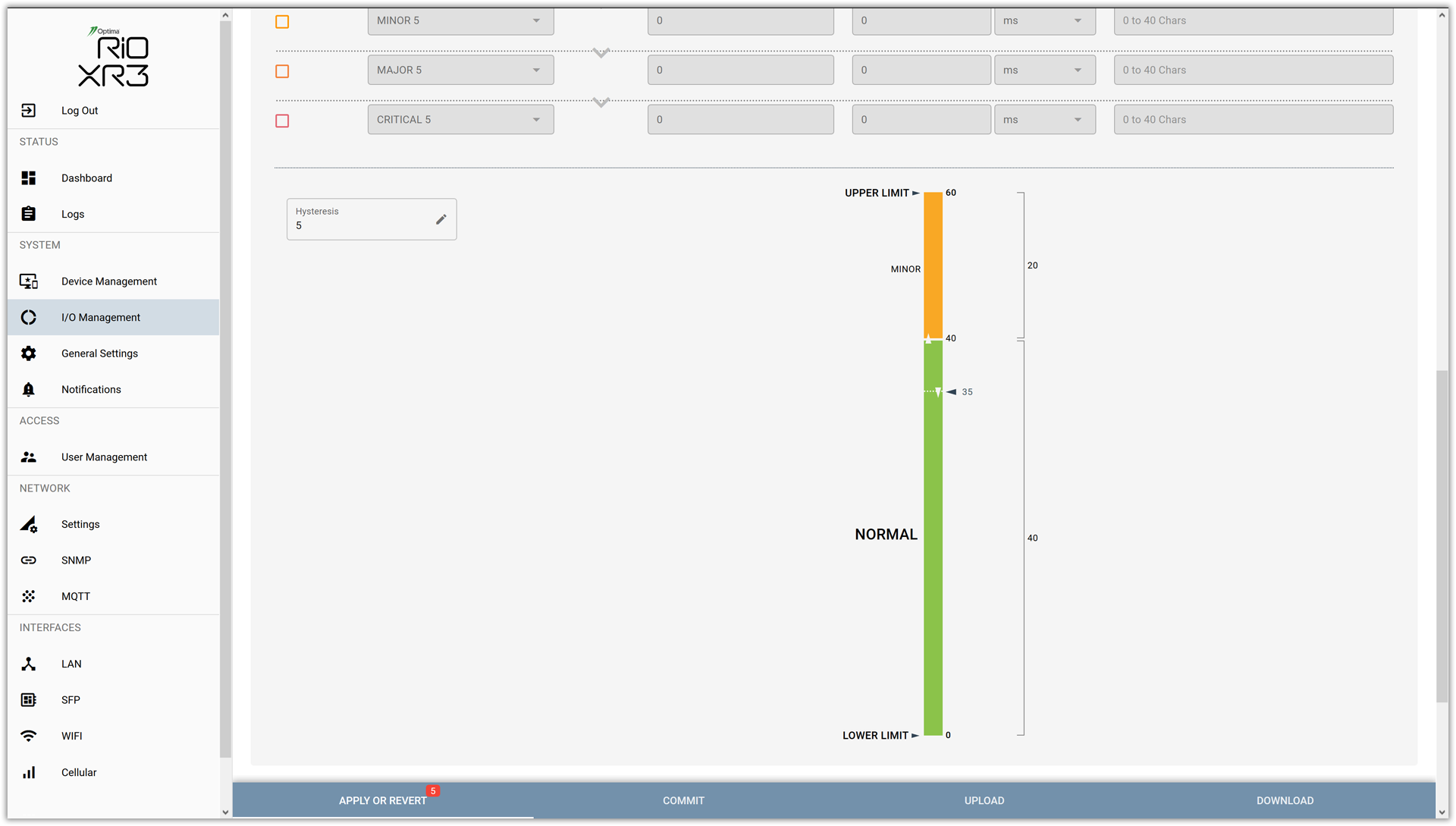
The resulting graph has been split into two ranges. The MINOR alarm range extends from just above 40 Vdc to 60 Vdc. The NORMAL range goes from 0 Vdc up 40 Vdc. On the right hand side, the deltas corresponding to each range are shown.
In the center, we can see the effect of the HYSTERESIS. Once in MINOR alarm, the input level will have to fall back down to 35 Vdc to be able to clear the alarm condition.
This provides the crucial separation between the alarm range and the normal range. It keeps the I/O from toggling unnecessarily. Specifying a suitable HYSTERESIS avoids the dreaded alarm chatter, which can be caused by input levels hovering just around the values specified by an alarm threshold.
Additionally, by specifying a QUALIFICATION PERIOD of 50 ms, we can further ensure that any crossing of the threshold lasting for less than the time specified by the QUALIFICATION PERIOD will be ignored.
Advanced Example
The next paragraphs pick up where PART 1 of this series left off. Initially, we had specified a set of parameters to condition an input. Ultimately, this resulted in a value ranging from 0 - 100%, in 10% increments. Now, let's have a look at how we could go about slightly tweaking the output, and then adding a whole set of escalating thresholds:
| OVERALL INPUT RANGE: | 0% to 100% |
| STEP SIZE: | 5% |
| NORMAL RANGE: | 100% down to 75% |
| INFO RANGE: | 75% down to 50% |
| WARNING RANGE: | 50% down to 35% |
| MINOR RANGE: | 35% down to 20% |
| MAJOR RANGE: | 20% down to 10% |
| CRITICAL RANGE: | 10% down to 0% |
| HYSTERESIS: | 2.5% |
| QUALIFICATION PERIOD: | various |
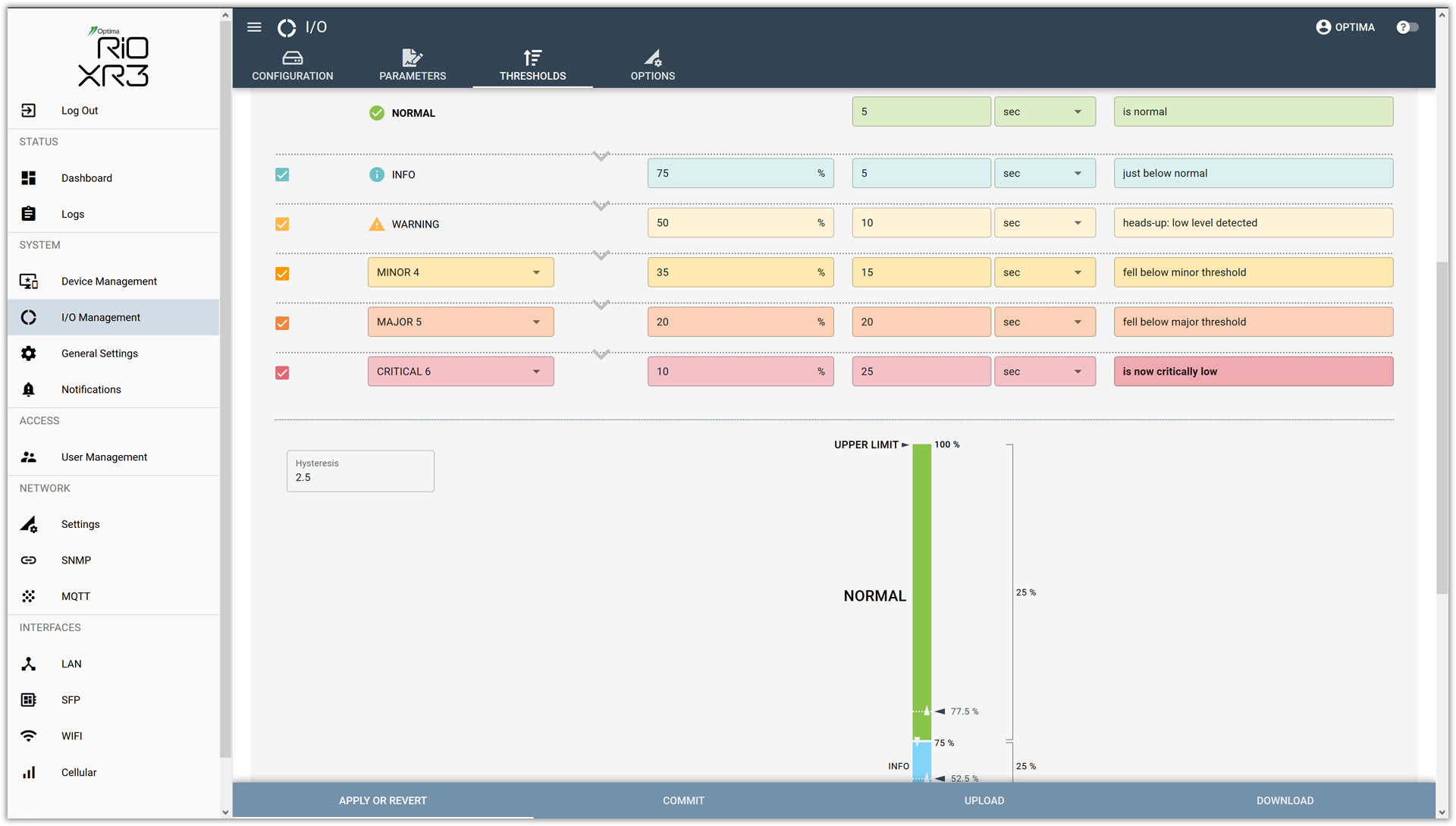
Here is how the corresponding graph changes in real-time:
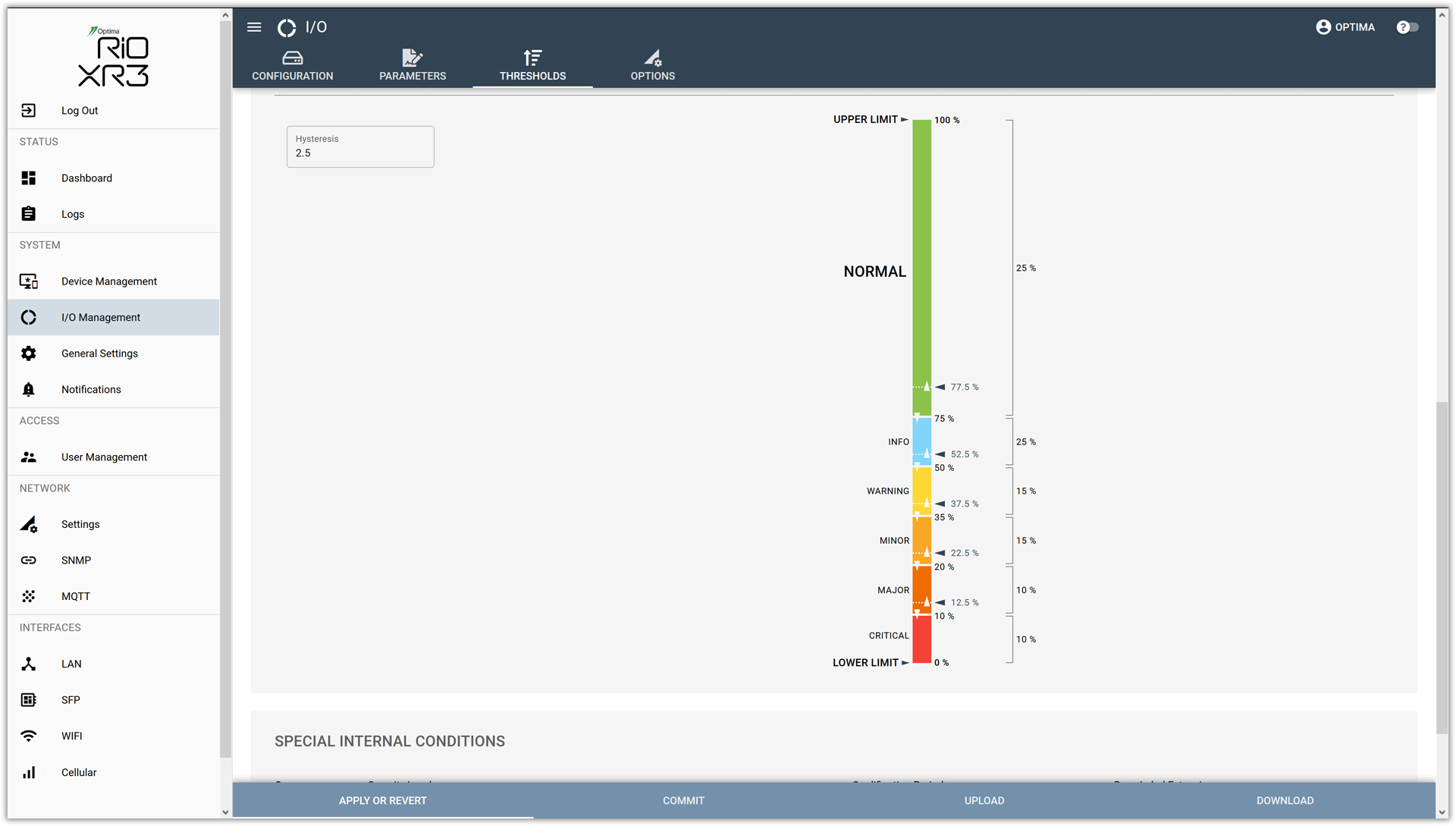
The resulting graph has been split into six ranges: NORMAL, INFO, WARNING, MINOR, MAJOR, and CRITICAL. Although they operate on a descending input value level, they carry an increasing severity. This is due to the fact that the lower the level in the fuel tank is dropping, the more important it becomes to take corrective action.
Again, on the right hand side, the deltas corresponding to each range are shown.
In the center, we can see the effect of the HYSTERESIS. Once in a certain alarm range, the input level will have to rise back up above the THRESHOLD + HYSTERESIS in order to clear each alarm range.
This provides the crucial separation between the individual alarm ranges. It keeps the I/O from flipping back and forth unnecessarily. Specifying a suitable HYSTERESIS avoids the dreaded alarm chatter, which can be caused by input levels hovering just around the values specified for each alarm threshold.
Additionally, by providing suitable QUALIFICATION PERIODs, we can further ensure that any crossing of a particular threshold lasting for less than the time specified will be ignored.
Alarm Labels
Since we have one BASE LABEL EXTENSION per alarm threshold, we can specify much more descriptive alarm labels to be carried in each alarm notification.
Optima firmly believes that the less cryptic an alarm message, the higher the chances that the true importance of the message will be be understood, and acted upon.
Here is the complete list from the above example, showing the resulting label.
NOTE: Keep in mind, these are suggestions only. These fields are user specified. They can be used to carry other details, such as recommendations for remedial actions or contact details.
The final result consists of the BASE LABEL (defined once per I/O), plus each BASE LABEL EXTENSION (one for each alarm/normal range).
BASE LABEL: Tank A Fuel Level
NORMAL RANGE: Tank A Fuel Level is normal
INFO RANGE: Tank A Fuel Level just below normal
WARNING RANGE: Tank A Fuel Level heads-up: low level detected
MINOR RANGE: Tank A Fuel Level fell below minor threshold
MAJOR RANGE: Tank A Fuel Level fell below major threshold
CRITICAL RANGE: Tank A Fuel Level is now critically low
Summary
The relatively small input signal was routed through the 5x GAIN stage, resulting in a better coverage of the analog input range available (-60Vdc to +60Vdc). Next, the OFFSET and SCALE worked in combination to invert and properly proportion the signal. No BIAS was required, so the parameter was set to zero. The QUANTIZER ensured that the step size of 5 was strictly enforced. The UPPER and LOWER LIMIT parameters guaranteed that even while the input signal swung below or above the expected signal range, the output did not stray beyond the user specified boundaries. The OUTPUT FORMAT ensured that the output was properly formatted. Last but not least, the UNIT STRING allows for the proper interpretation of the result.
The example above clearly highlights the power of the available parametric interface. The web-based Optima GUI makes even complex operations easy.
Outlook
The upcoming 3rd installment in this series will focus on how to configure discrete contact inputs. Stay tuned.
Ralf Doewich
Optima Tele.com, Inc.