The question whether or not to add a termination resistor comes up during a good number of MODBUS installations.
Yet there is no hard and fast rule as to when a resistor needs to be installed. Much depends on the type and length of MODBUS cabling and the total resistances/capacitances of the loaded MODBUS.
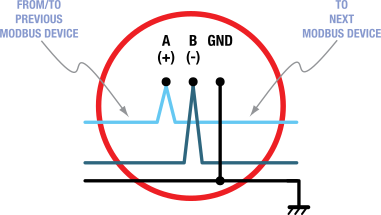
When wiring MODBUS devices, make sure you run the bus from device to device. The intent is to avoid long ‘drops’ from the main bus.
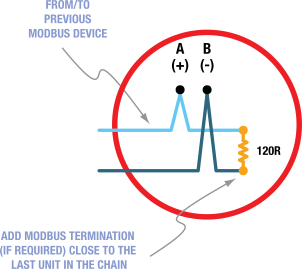
Termination resistors are typically added at both ends of the MODBUS wiring (in front of the first device, and after the last device connected to the bus).
Here are a few guidelines which we usually provide in such cases. Install a termination resistor if:
you notice a large number of MODBUS INIT messages popping up in the ecoSENTRY logs,
the MODBUS cabling length exceeds what you would normally run within a shelter,
your wiring goes outside or between shelters,
the cabling involves a few cross connects,
you happen to have long drops from the ‘main bus’,
or you have a good number of MODBUS sensors connected to the same bus.
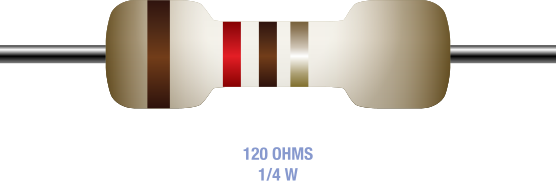
The MODBUS specifications call for termination resistors (120 to 150 ohms, 0.25W) on both ends.
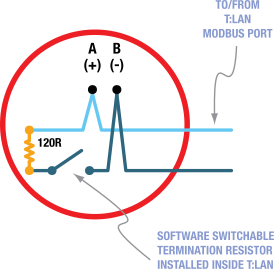
The T:LAN features a built in resistor that can be controlled via software.
For a quick test, you can enable/disable the termination on the T:LAN side by logging into the T:LAN, then navigating to the CRAFT/SERIAL AND SDC MENU. Use the MODBUS T-[R]esistor option to switch the resistor on/off.
NOTE: Daisy-chain MODBUS devices.
NOTE: All MODBUS devices are optional.
NOTE: T:LAN does not require MODBUS devices to be placed in any specific order.
NOTE: Do not exceed T:LAN MODBUS power budget when powering external devices from T:LAN.
IMPORTANT: The MODBUS termination in the T:LAN should only be enabled when physically placing/enabling a termination resistor at the far end of the MODBUS wiring run.