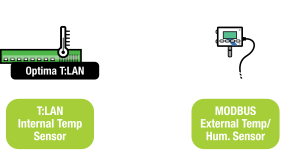
Previously, the ecoSENTRY application supported a mix of internal (on-board T:LAN sensor) and external temperature and humidity sensors (OneWire enviroSENSOR). Starting with V3.05C, the ecoSENTRY app now also supports MODBUS based temperature and humidity sensing.
The following configuration option has been added:
Configure the HUM-W sensor as follows:
Run in MODBUS protocol,
Set the RS-485 baud rate to 19200, and
Set the MODBUS ID to 10.
Connect the unit to the MODBUS & power.
Configure the ecoSENTRY app as follows:
Go the ecoSENTRY MAIN MENU,
Go to the enviroSENSOR MENU page,
Set option [d] eS - Int. Temperature Sensor Index to 5.
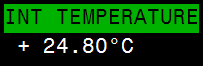
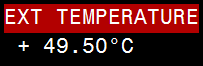
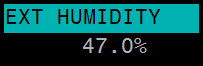
The temperature and humidity readings from the HUM-W sensor will now be shown in the same spot the enviroSENSOR ws-7 display usually appears: on the ecoSENTRY main dashboard display, on the right hand side, below the QUICK STATS. The ecoSENTRY app cycles periodically through these three stages:
NOTE: The Internal Temperature is driven by the on-board T:LAN temp sensor. The External Temperature/Humidity is driven by the HUM-W sensor.
The display will use color to indicate alarm/normal states:
ALARM (RED)
Thresholds have been crossed. In active alarm state.
NORMAL (GREEN)
Regular operating mode. Normal state.
NO THRESHOLDS (CYAN)
No alarm thresholds defined. Active.
INACTIVE (DARK BLUE)
No data/no communications. Off.
The application polls the HUM-W sensor on the top of the hour, and every 5 minutes thereafter.
Since the HUM-W sensor requires about 35s to boot/power up, the app delays the first reading of the sensor. Once probed, the following log entries will show up in the lower part of the screen:
Date & Time LevelEventDetails 2017-11-21 13:27:13
2017-11-21 13:27:13
2017-11-21 13:27:13
If the ecoSENTRY app cannot find the sensor or loses communication, then the following entry will be logged:
Date & Time LevelEventDetails 2017-11-21 13:45:03 xxx.xxHUM-W FAIL-1
The ecoSENTRY app will monitor and report any threshold crossings as follows:
Date & Time LevelEventDetails 2017-11-21 13:47:02 xxx.xxEXT TMP ALRM+22.80°C
Each log entry becomes part of the daily log files on drive B:. In addition, the sensor readings will also be entered every 5min in the daily records files (also on drive B:) under the corresponding enviroSENSOR columns. This creates 288 data points/day, and 2,016 data points per week.