Starting with ecoSENTRY V2.96C, the application supports the use of a separate template file which allows the user to individually control the severity levels of each ecoSENTRYSNMPv2 InformRequests PDU (also commonly referred to as an SNMP trap). From the application menus, the user can only modify the severity level used by a whole group/set of event notifications. The values normally used by the application are:
Group
Defined by
Parameter
Source
GENSET
User
TSGS
GENSET MENU
RUNTIME
User
TSRT
GENSET MENU
POWER
User
TSPS
MAINS/DC MENU
FUEL
User
TSFL
FUEL MENU
WIND
User
TSWT
WIND MENU
GENERAL
User
TSGL
OPTIONS MENU
eSENSOR
User
TSES
ecoSENTRY.par FILE
APP
App
-
fixed
These additional features are enabled by placing a file called ecoSENTRY.sev on the same drive/directory where the application resides. Through the use of the template file, any of the notifications generated by the application can be individually enabled or disabled. At the same time, the user may also specify an override for the severity level (if required).
NOTE: The template only lists the ALARM RAISED events. ALARM CLEAR events always use the NORMAL severity level (fixed).
NOTE: If the ALARM RAISED is being turned off, then the corresponding ALARM CLEAR events are turned off as well.
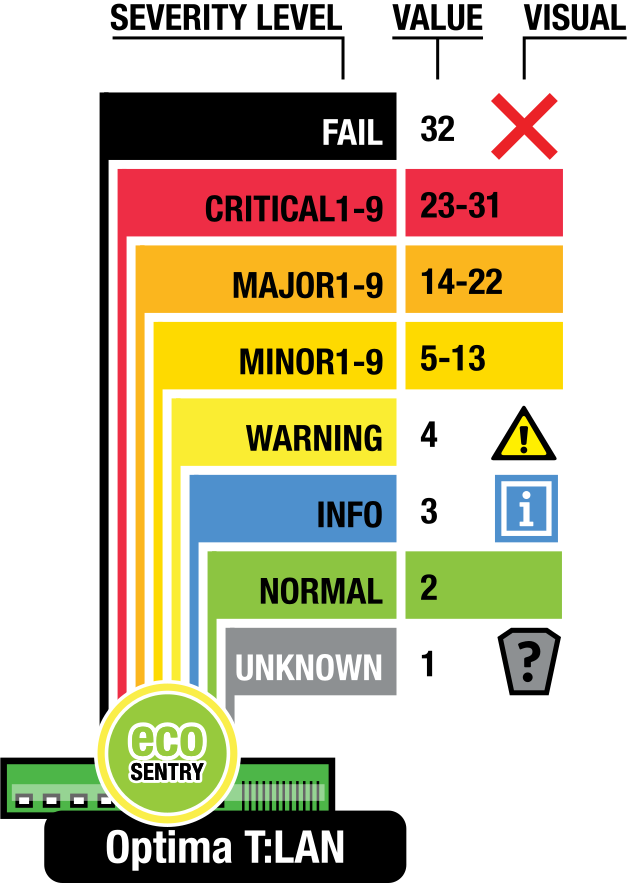
The application uses the standard T:LAN alarm severity levels to report events via SNMP:
Instructions:
Only template file lines starting with a digit (0-9) will be analyzed
The 1st number in each line represents the event code
Allows a maximum of 3 digits/event code. Refer to illustration above
Use the CUSTOM column to override the default severity level
Line contents beyond the first 10 characters will be treated as comments
Use either SPACES or TABS as separators
Upper or lower case supported
Avoid duplicating entries
Last line found with the same event code overrides prior entries
Modify the template file using any text editor
Then save the modified copy to the drive/directory where the application loads from
Make sure to name the file (exactly as shown): ecoSENTRY.sev
Re-start the ecoSENTRY app to apply changes
Requires ecoSENTRY V2.96C or newer
NOTE: Update the template file only when it is not actively being scanned by the ecoSENTRY app.
Supported values for the CUSTOM column are:
Custom Column
Result
empty space
default severity applies
OFF
suppressed, no notification will be generated
INFO
notification sent with severity = INFORMATIONAL
WARN
notification sent with severity = WARNING
MIN1 to MIN9
notification sent with severity = MINOR 1-9
MAJ1 to MAJ9
notification sent with severity = MAJOR 1-9
CRI1 to CRI9
notification sent with severity = CRITICAL 1-9
FAIL
notification sent with severity = FAILED
Example:
As an example, here are a few modified lines from the custom severity template file: